

Kiln for classrooms
A coding coach
at every desk.
Kiln is a free desktop app for learning to code. Students write real code, checks grade it the moment they press Check answer, and Sakura gives hints instead of answers — so you can spend class time with the students who need you most.
- courses
- 5courses
- lessons
- 107lessons
- automatic checks
- 234automatic checks
- guided projects
- 15guided projects
What your students get
Checks that run their real code
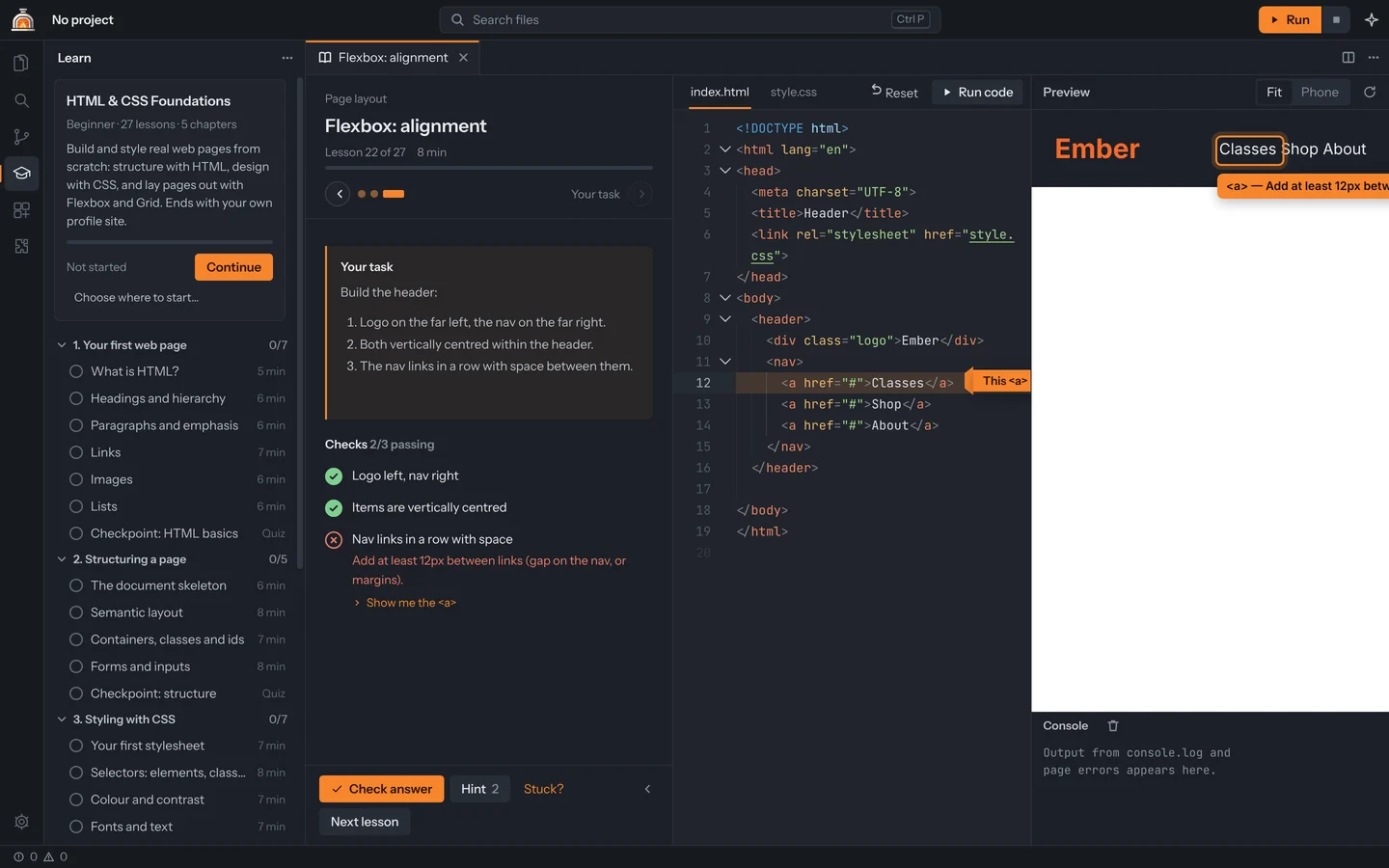
In Python, JavaScript, Java and C++, checks run the student’s program, type in input and read what it prints. In HTML & CSS they test the page itself — layout, colours, contrast. A failing check points an arrow at the line to fix.
Hints, not answers
Sakura, Kiln’s coach, reviews every check: what went well, what to fix, and a push when they’re stuck. Hints come one at a time, and she never hands over the solution.
They can see inside their program
Step through runs Python and JavaScript one line at a time, forwards and backwards, with every variable on screen. The debugger adds breakpoints and watch for Python, JavaScript, C and C++.
Lessons turn into projects
When a course project passes, Continue in editor makes it a real project. 15 guided projects — games, apps, websites and a React project — walk them through building more.
Five courses, one app
Short steps, a task at the end of each lesson, quizzes and a final project. Nothing is locked, so students can go at their own pace, and each course keeps its own progress.
Every lesson in every course| Course | Level | Lessons |
|---|---|---|
| HTML & CSS | Beginner | 27 |
| Python | Beginner | 15 |
| JavaScript | Beginner | 15 |
| C++ | Beginner → Intermediate | 35 |
| Java | Beginner | 15 |
Made for school computers
No administrator password
On Windows, Kiln installs just for the person signed in. No IT ticket needed to get started.
Languages install themselves
The first time a lesson needs C/C++, Python or Java on Windows, Kiln offers to set it up inside its own folder — again without admin.
JavaScript works straight away
JavaScript and TypeScript run with Kiln’s own Node.js, and HTML & CSS lessons preview inside Kiln.
Windows, macOS and Linux
Linux comes as a .deb or .tar.gz. The macOS build hasn’t been tested on a real Mac yet.
Robotics teams
Many robotics teams program in C++ or Java, and Kiln teaches both. The C++ course runs 35 lessons from first program to intermediate level, every one checked with a real compiler, and the debugger lets new members pause their code and watch the values change.
Kiln doesn’t send code to a robot. Use your robot’s own tools for that — Kiln is where students learn the language first.
At school and at home
Students don’t need an account to use Kiln. Those who want to keep going at home can make a free Kiln account, and their lesson progress and settings follow them to any computer they sign in on. Their code stays in their own folders.
Kiln accounts are for ages 13 and up. Younger students can use Kiln without one. Privacy policy
Before your first class
- 1
Install Kiln on each computer from the download page. On Windows it takes a minute and asks for no password.
- 2
Before the first lesson, open a lesson in each language you’ll teach and let Kiln install it. On Windows it installs per user, so on shared computers each student account does this once.
- 3
Optional: set up an AI service in Settings → AI so Sakura’s reviews read the student’s actual code. Without one, she still gives built-in feedback on every check.
- 4
Have students open Learn, pick the course tab, and press Continue. Everything saves on its own.
What Kiln doesn’t do yet
- There’s no teacher dashboard or class list yet. Progress lives on each student’s computer, or in their Kiln account if they make one.
- Kiln is a desktop app. It doesn’t run in a browser, on Chromebooks or on iPads.
- Kiln isn’t code-signed yet, so some school computers block it until IT allows it. The download page has checksums so IT can confirm the file is genuine.
Teaching with Kiln?
Tell us what your class needs — a teacher dashboard, a new course, something that got in the way. It goes straight to the two people who build Kiln.